
Grandstand - Events & Guides
Grandstand AppsEvents
3.95.00 Reviews
- Version
- 4.0.9
- Installs
- 10.00K
- Age Rating
- Everyone
Screenshots
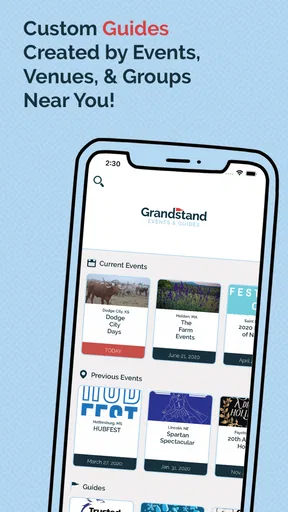
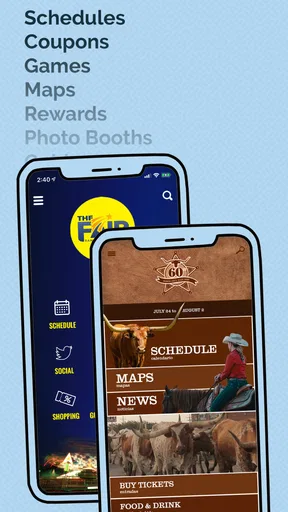
Our Review of Grandstand - Events & Guides
 Analysis by Appyee
When I first opened Grandstand - Events & Guides, I approached it as a practical event companion rather than another general-purpose calendar. That distinction matters. A calendar can remind me that something is happening, while this app is designed to help me work out what to do once I am interested in attending: check the schedule, find a map, look for vendors, and think about food and other details in one place. For a household or group sharing plans, that focus can be genuinely useful.
Grandstand Apps has built this free Events app for people who need event information in a more usable form than a poster, social post, or scattered web search. It has been available since September 13, 2017, and the current version is 4.0.9. I see it as a focused tool for the day around an event, especially when several people are deciding where to meet, what to see first, and whether the venue has the practical details they need.
How Grandstand works when several people are planning together
When several people are planning together, I find it helps to treat Grandstand as a shared reference rather than a place to manage the group. I would use the guide to compare priorities, then agree on one simple meeting point and a fallback plan before leaving. That keeps the next decision focused on how each person can use the event information without assuming everyone will be carrying the same phone.
A shared-use scenario that makes sense
Imagine a household heading to a local event on a busy weekend. One person wants to know when the main activity begins, another wants to locate food, and someone else is more concerned with finding vendors or understanding the layout. Without a dedicated guide, everyone may be checking a different page or passing around screenshots. I found the appeal here in bringing those event-specific pieces together, so the group can discuss one source instead of trying to remember several separate details.
This is particularly helpful when plans are flexible. Rather than treating the event as a single appointment, I can use the schedule to decide which parts are worth prioritizing, then use the map and vendor information to make the visit more realistic. That workflow is more useful than simply saving an event to a phone calendar, because it connects the timetable with the physical experience of being there.
There is also a small but important household advantage: the app can support conversation without requiring every person to become an expert in the event. A parent, partner, friend, or older child can look through the same guide and say what they want to see. The app does not replace an agreed meeting point or a direct message, but it gives the group a shared reference before leaving home.
What I would check before leaving
My preferred routine is to open the relevant event while I still have time to think. I would first scan the schedule for the parts that matter most, then inspect the map before anyone starts travelling. After that, I would look at vendors and food options and make a short plan that suits the group rather than trying to attend everything.
That order is more effective than starting with the map alone. A map shows where things are, but the schedule tells me whether moving across the venue is worthwhile at a particular moment. Likewise, vendor information becomes more useful when I already know where a gap in the day might occur. This simple sequence is one of the app’s strongest practical qualities: it encourages planning around the event instead of collecting disconnected facts.
I would also take a screenshot or make a note of the most important meeting information if the group is likely to separate. I am not treating that as a built-in function; it is a sensible backup habit. A guide can help everyone understand the venue, but it should not be the only plan for finding one another in a crowded place.
Setup boundaries on a shared device
Grandstand is easy to position in a shared-device routine because it is free and aimed at general audiences. The content rating is Everyone, which makes it a comfortable choice for households where different age groups may look at the same event details. Still, an age rating is not the same thing as a complete family-management system. I would not assume that it creates separate child profiles, limits access, or manages communication between household members.
That boundary is worth understanding before installing it on a family tablet or a phone used by several people. The app’s role is event guidance, not account administration. If one person is responsible for choosing the event, another for checking food, and another for arranging transport, those responsibilities still need to be agreed outside the app. Grandstand can support the information side of that process, but it does not solve household organization by itself.
On a shared phone, I would keep expectations modest and practical. The most useful approach is to open the guide together, identify the schedule items and locations that matter, and then let each person remember or record their own part. This avoids assuming that every household member will always have the same device available at the venue.
The minimum operating-system requirement is Android 6.0, so the app can suit some older Android devices that are still used as secondary household phones. That is helpful for families who do not upgrade every device at the same time. I would still test it on the actual phone before an important outing, because an older compatible device may feel slower or have less comfortable screen space for maps and schedules.
Coordination without turning the app into a group chat
The most natural way to use Grandstand with other people is as a shared reference, not as a messaging replacement. Before the event, I would agree on one or two priorities: perhaps a scheduled activity and a food area. Then I would choose a simple fallback meeting location using the map. This gives the group a plan that remains understandable even if people split up.
The schedule is valuable here because it can expose conflicts early. If two people want activities at different times or in different parts of the venue, the group can decide whether to divide temporarily or choose one shared option. That is better than discovering the conflict after arriving, when noise, crowds, and limited attention make decisions harder.
Maps can also change how I estimate the day. A venue may look manageable when viewed as a list, but the physical distance between areas can affect whether a quick food stop is realistic. I would use the map to avoid creating an overpacked itinerary. In my experience, leaving space between scheduled items makes a group outing more enjoyable than trying to move constantly from one attraction to the next.
Vendor information adds another layer to coordination. If someone in the household wants to browse while another person wants food, the guide can help identify whether those interests are near one another. That does not guarantee that every preference will be covered, but it makes compromise more informed. Instead of saying “we will figure it out there,” the group can make a reasonable plan before arriving.
Age, trust, and sensible expectations
Because Grandstand is rated for Everyone, I can imagine it being used by adults, teenagers, and younger family members looking over an event guide. The straightforward content areas—schedules, maps, vendors, and food—are easier to share than an app centered on public posting or direct interaction. That makes it feel appropriate for browsing event logistics together.
Even so, I would keep the usual age and trust habits in place. A child using the app should still know who to stay with, where to meet a trusted adult, and what to do if the group becomes separated. An event guide can show useful locations, but it cannot judge whether a particular route is comfortable, supervised, or suitable for every member of the household.
This is also where the app’s focused nature helps. It gives younger users something concrete to inspect, such as the timetable or food area, without asking them to manage a complicated planning platform. At the same time, adults should make the final decisions about travel, meeting points, money, and supervision. I would treat the app as a planning aid that supports trust, not as a substitute for it.
Where it is stronger than ordinary alternatives
The usual alternative is a mixture of web searches, social-media posts, printed flyers, map apps, and a phone calendar. Each tool may provide one useful piece, but the information is often separated. A calendar can remind me of the date, a map app can show the venue, and a search engine can find a vendor list, yet I still have to connect everything manually.
Grandstand’s advantage is its event-centered arrangement. When the relevant schedules, maps, vendors, and food information are available for an event, I can move through those needs without repeatedly changing context. That is especially convenient for a household where not everyone wants to search independently or where one person is coordinating the day.
The trade-off is that it is not a universal planning tool. I would still prefer a normal calendar for reminders across many kinds of appointments, a navigation app for detailed travel directions, and direct communication for last-minute changes between people. Grandstand is best when the event itself is the center of attention; it is less useful as a permanent organizer for everything around it.
Practical limitations I noticed in the concept
The app’s usefulness depends heavily on the quality and completeness of the event guide available to me. If the schedule is clear and the map is practical, it can reduce preparation time. If the information is sparse or difficult to interpret, the app cannot create details that the event organizer has not made available. I would therefore use it as an important reference, but not assume that it eliminates the need to check major arrangements before travelling.
There is also a difference between having information and having live coordination. A schedule can help me understand the intended program, but real events may involve delays, crowding, or changes. For a household, that means the app works best alongside a simple backup plan: one meeting place, one way to contact one another, and a decision about what to do if someone misses an activity.
Another limitation is scope. Someone looking for ticket management, detailed journey planning, household task assignments, or a full shared calendar may find the experience too narrow. I would not install it expecting an all-in-one family organizer. Its value comes from concentrating on event information, and that same concentration means it should be paired with other tools when the outing involves more complicated logistics.
Who should use it, and who should skip it
I would recommend Grandstand to someone who attends organized events and wants a clearer way to prepare around the venue. It is particularly suitable for households, friends, or small groups that need to compare schedules, locate food, and decide how to move through an event together. It can also help a person who dislikes juggling several browser tabs just to understand what is happening on site.
I would be more cautious recommending it to someone who only wants automatic reminders or broad local discovery. A standard calendar may be simpler for reminders, while a general events service may be better for browsing many unrelated activities. Likewise, people who need precise transportation information or instant updates should continue using tools designed specifically for those jobs.
The app has an average rating of 3.9 from around 15 ratings, with 5 written reviews, and it has passed 10 thousand installs. Those figures suggest a modest user base rather than the reach of a mainstream platform. I read that as a reason to judge it by usefulness for the particular event, not by popularity alone. If the event you care about is represented well, the focused design may matter more than the size of the wider audience.
My household verdict
After looking at how it fits into shared planning, I see Grandstand as a useful companion for the practical middle of an outing: the point where a household has chosen an event but still needs to decide how to spend time there. Its combination of schedules, maps, vendors, and food information can turn a vague plan into something the group can discuss.
I especially like the way it encourages realistic coordination. Checking the timetable before the map, leaving room for movement, and agreeing on a meeting point are small habits, but they make the app more valuable than simply opening it at the entrance. Those are the kinds of uses that are easy to miss when judging it only by its short description.
My recommendation is conditional but positive. If you want a focused event guide and your household needs one shared place to inspect the day, Grandstand - Events & Guides is worth trying because it is free, broadly age-appropriate, and available for Android devices running 6.0 or later. If you need a complete family calendar, live group messaging, or detailed travel planning, choose a dedicated tool for those needs instead.
For me, the best reason to keep it installed is not that it replaces every other app. It is that it gives an event its own practical workspace. Used with clear household boundaries and a simple offline backup plan, it can make the difference between arriving with a loose idea and arriving with a day everyone understands.
Verdict
Strengths of Grandstand - Events & Guides
- Clear event information helps users plan visits quickly.
- Useful guides can make large venues easier to navigate.
- Helpful for discovering events in one central app.
- Convenient access to schedules and venue details on mobile.
- Can reduce the need to search across multiple event websites.
Limitations of Grandstand - Events & Guides
- Coverage may be limited to selected events or locations.
- Some listings could become outdated if organizers change details.
- The app may be less useful outside major venues or cities.
- Extra features may depend on an internet connection.
- Event information quality can vary between different organizers.
Similar Picks in This Category
View All
Easy Quran Mp3 Audio Offline
Muslim Worldapp4.7

Invitation Maker: Cards & RSVP
Greetings Island4.9

StubHub - Live Event Tickets
StubHub4.3

Fever: Events & Tickets
Fever Labs4.7

Epic Freebie Games Radar
Arioch Pds - Apps & Games4.4

Invitation card Maker, Design
Splendid App Maker4.9
Frequently Asked Questions
What is Grandstand - Events & Guides?
Grandstand - Events & Guides is an event-discovery and information app designed to help users find events, explore available guides, and keep track of activities that may interest them. Depending on the location and event coverage, it can provide practical details such as schedules, venues, descriptions, and related updates, making it useful for planning before attending.
What type of events and guides can I find in Grandstand?
The content available in Grandstand may vary by region and by the organizers or publishers contributing information to the platform. Users can generally expect event listings, venue-related information, schedules, recommendations, and guides intended to make attending or following an event easier. Checking the app regularly is recommended because listings and details may change over time.
Does Grandstand - Events & Guides require an account?
Some parts of Grandstand may be accessible without registration, allowing users to browse events and guides as guests. However, an account may be needed for features such as saving favorites, receiving personalized updates, managing preferences, or interacting with certain event tools. The exact requirements can depend on the current app version and the services enabled for your location.
Is Grandstand - Events & Guides free to download and use?
Grandstand - Events & Guides may be available as a free download, but users should review the store listing carefully for possible optional purchases, subscriptions, or event-specific charges. Downloading the app does not necessarily mean that every event or service shown inside it is free. Tickets, reservations, premium content, or venue fees may be handled separately.
Are the event details in Grandstand always accurate and up to date?
The app is intended to provide helpful event information, but schedules, locations, availability, admission rules, and organizer details can change without warning. Information may come from event organizers or other external sources, so it is wise to confirm important details through the official event website or organizer before traveling, purchasing tickets, or making final plans.
